Complete Server-Side Verification
While it's true that a significant number of authenticity checks can be successfully completed in the browser, it might not be sufficient. There's a potential risk of verification results being intercepted and modified by fraudsters directly on the same device. So, Regula introduces an additional layer of protection against this type of fraud through the Complete Server-Side Verification.
- Sequence Diagram
- Preparation
- Step 1: Optical Processing
- Step 2: Finalize Package
- Step 3: Reprocessing on Web Service
- Step 4: Retrieve Processed Data
- Example
Sequence Diagram
See the sequence diagram of the entire document processing (click to enlarge).
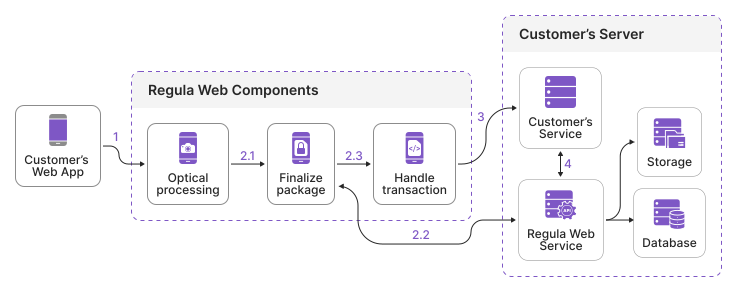
Review the process step by step.
Preparation
Enable the backend processing feature on the Web Components side and set the URL to your Web Service:
window.RegulaDocumentSDK.recognizerProcessParam = {
  processParam: {
    scenario: InternalScenarios.MrzAndLocate,
    backendProcessing: {
      serviceURL: '<your_service_url>'
    }
  },
};
For the Complete Server-Side Verification, you need to run Regula Web Service in your environment. Refer to the Web Service section for instructions on how to do that.
HTTP headers
Since Regula Web Service is involved when working with Regula Web Components, you may need to adjust HTTP request headers in your application to pass additional information to the Web Service, for example, the authentication token. That can be achieved in the following way:
window.RegulaDocumentSDK.recognizerProcessParam = {
  processParam: {
    scenario: InternalScenarios.MrzAndLocate,
    backendProcessing: {
      serviceURL: '<your_service_url>', // Web API service URL
      httpHeaders: { // optional
        key1: '<header_1>',
        key2: '<header_2>',
        key3: '<header_3>'
      }
    }
  },
};
Step 1: Optical Processing
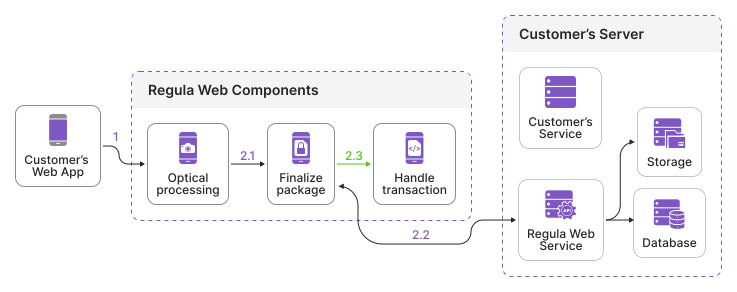
The first step is the optical processing that is performed on the browser side (click image to enlarge).
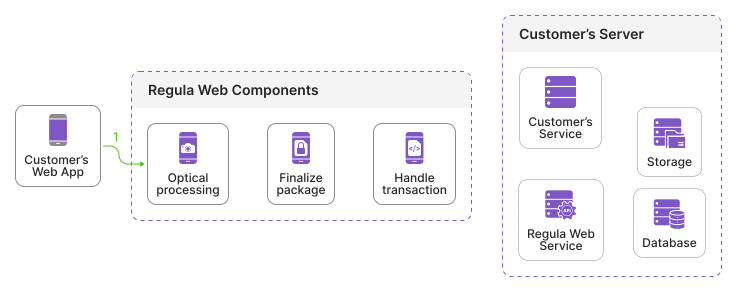
To initiate the optical processing, follow the Add Component guide.
Once the optical processing is completed, the encrypted result package is generated.
Step 2: Finalize Package
The next step is to finalize results. It means that they are encrypted on the browser side and then transmitted to Regula Web Service via the secure communication channel (click image to enlarge).
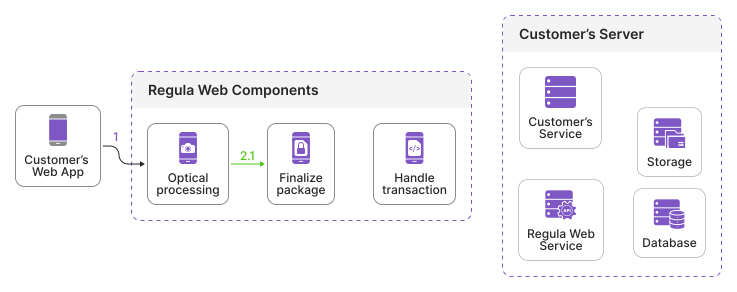
During transmission, Storage and Database save transaction info, metadata, results, and other related information.
Once the package is sent to Regula Web Service, you need to handle the transactionId that is returned in the callback and prepare it for sending to your service. See the code sample below.
const component = document.querySelector('document-reader');

function listener(event) {
  if (event.detail.action === 'PROCESS_FINISHED' && event.detail.data.status === 1) {
    const transactionId = window.RegulaDocumentSDK.finalizePackage();
    console.log(transactionId);
  }
}

component.addEventListener('document-reader', listener);
The last step of finalizing the data package is to send the obtained transactionId to your backend (Customer Service). Retain the transactionId on your Customer Service to request Regula Web Service for reprocessing later.
Step 3: Reprocessing on Web Service
After you receive the encrypted results, prepare the reprocessing request to Regula Web Service (click image to enlarge).
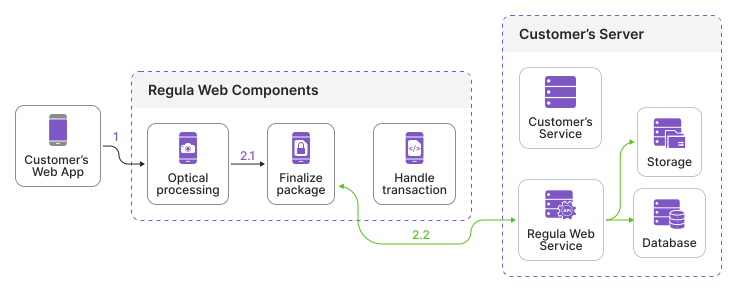
The request body should include at least the processing scenario and other settings depending on your needs:
{
    "processParam": {
        "scenario": "FullAuth"
    }
}
Send the request to Regula Web Service to the following endpoint:
POST /api/v2/transaction/{transaction_id}/process
where {transaction_id} is the value returned in the Step 2.
Request example using cURL
curl --request POST \
--url "http://localhost:8088/api/v2/transaction/76fa69d1-5ba6-4aa0-8dd5-477c8f81df91/process" \
--header "Content-Type: application/json" \
--data '{ "processParam": { "scenario": "FullAuth" } }'
Note
The request above demonstrates only the structure that should be followed, but doesn't contain any data, so you won't receive any results from the Regula Web Service if you run it.
Regula Web Service fetches raw data from the Data Store, processes it and then saves the reprocessed results back to the Data Store. This step may be time-consuming, so the results of the document's reprocessing are not returned in the same HTTP response. To get the processed data, follow the next Step 4.
Step 4: Retrieve Processed Data
After the data has been processed on the Regula Web Service side and saved to the Data Store, you can retrieve the results (click image to enlarge).
Send the request to Regula Web Service to the following endpoint:
GET /api/v2/transaction/{transaction_id}/results
where {transaction_id} is the value returned in the Step 2 and used in the reprocessing request, see the Step 3.
curl --request GET \
--url "http://localhost:8088/api/v2/transaction/76fa69d1-5ba6-4aa0-8dd5-477c8f81df91/results" \
--header "Content-Type: application/json"
This marks the final step of the Complete Server-Side Verification. Once the server-side reprocessing is completed, you can then handle the results appropriately and determine whether to trust the Web Components outcome.
Example
See the sample project that demonstrates how to set up the Complete Server-Side Verification on Web Components.