Online License Transactions for Document Reader SDK
Tag
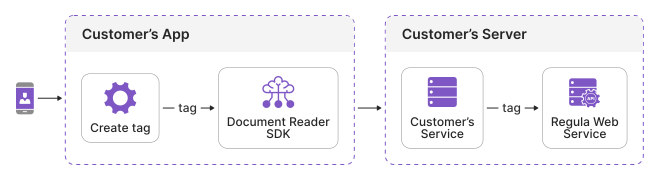
A tag is a randomly generated unique identifier for a user journey. It can be any string value and must be unique.
A user journey covers the processing of one document only. For example, a passport and an ID card of the same person represent two user journeys.
When using an online license, each call to the Document Reader SDK is counted as a transaction. If the tag is specified during a continuous user journey, multiple transactions can be combined into one session. However, if Server-Side Verification or Online Processing is used, transactions are automatically combined into sessions without needing to set a tag.
For example, your application captures a photo of an identity document on a mobile device and processes it on a server, without using Server-Side Verification or Online Processing. In this case, you can use the same tag in both the Document Reader Mobile SDK and the Document Reader Web Service. The Regula licensing service counts this user journey as a single session.
Warning
Each tag can only be used once, so use different tags for each user journey.
Implementing sessions may require a different type of license and pricing structure. For detailed information and specific terms, contact your account manager or submit a support request.
The tag property is optional. You can set it in the Document Reader Mobile SDK, the Document Reader Web Components, and the Document Reader Web Service.
Tenant
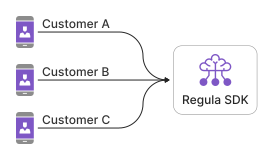
A tenant can be used to differentiate transactions based on customers, applications, or other criteria. For instance, if you have multiple company customers, you can assign a name to each customer to group transactions by these specified names.
Info
The tenant property is optional. If you use it, set it on both the client side and the server side: the Document Reader Mobile SDK, the Document Reader Web Components, and the Document Reader Web Service.
Environment
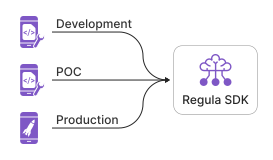
An environment can be used to differentiate transactions by development stages. For instance, if you have development, POC, and production stages, you can assign a name to each stage to group transactions by these specified names.
Info
The environment property is optional. If you use it, set it on both the client side and the server side: the Document Reader Mobile SDK, the Document Reader Web Components, and the Document Reader Web Service.
How to Set Up
Tag, tenant, and environment properties can be used either separately or together.
Info
Only Latin uppercase and lowercase letters, digits, hyphens, and underscores are allowed. The maximum length is 127 characters.
To set up transaction properties, see: