Content Security Policy for Web Components
Content Security Policy (CSP) helps prevent harmful content injection into web pages by controlling which scripts and resources can be loaded and executed.
CSP Nonce
The Document Reader Web Components support CSP nonce-based script authorization. A nonce is a unique cryptographic token generated on the server side and included both in the CSP header and in the page content. The browser allows only scripts with the matching nonce to run.
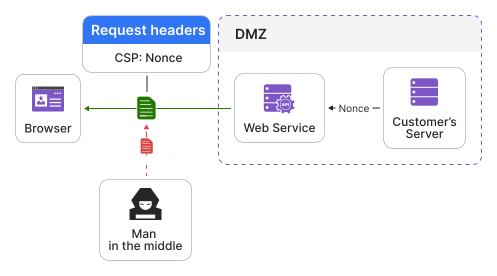
To maintain a strict CSP configuration for scripts, you can use the nonce setting.
For example:
const component = document.querySelector('document-reader');

component.settings = {
  nonce: '<your_nonce_value>'
};
The nonce value must match the nonce specified in your CSP header.
For details about the nonce setting, see Settings and Attributes.
WebAssembly Requirements
The Document Reader Web Components use WebAssembly to run Regula C++ code compiled for browser execution. Therefore, strict CSP configurations must allow WebAssembly execution by using wasm-unsafe-eval or, where required for browser compatibility, unsafe-eval.
If your website uses CSP, include the following source expression in the script-src directive:
Content-Security-Policy: script-src 'self' 'wasm-unsafe-eval';
If wasm-unsafe-eval is not supported by your target browsers, use unsafe-eval instead:
Content-Security-Policy: script-src 'self' 'unsafe-eval';
Note
Use unsafe-eval only when your target browsers do not support wasm-unsafe-eval. Prefer wasm-unsafe-eval when it is supported.
This requirement is related to WebAssembly execution in the browser and does not mean that the component runs untrusted code or evaluates arbitrary customer-provided scripts.