Enroll and Verify with Face SDK Web Service
Enroll and Verify helps you implement biometric authentication with the Face SDK Web Service. This combines liveness, face comparison, and person database operations in a single integrated flow.
Use Enroll to create a person and associate a biometric sample with their record. Then, use Verify to confirm that the person completing a liveness check matches the enrolled person.
For mobile integration, see Enroll and Verify with Face SDK Mobile. For Web Components, see the enroll and verify Settings.
How Enroll and Verify Works
Enroll and Verify combines liveness, face comparison, search, and person database operations into a biometric authentication workflow.
The workflow consists of two main operations:
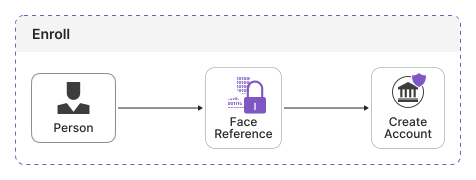
1. Enroll creates a person using a facial image captured during liveness. During enrollment, you can also search the database before creating a person. If a matching person is found, the Face SDK returns the matching records instead of creating another person.
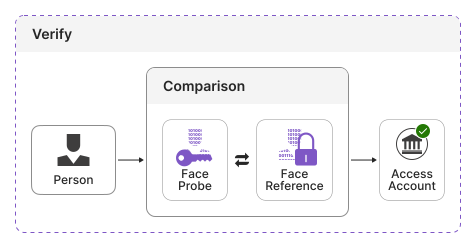
2. Verify confirms the identity of an enrolled person by performing liveness and comparing the captured facial image with the enrolled biometric sample.
Persons can be assigned to groups, which lets you keep separate business processes within the same Face SDK Web Service instance.
Key Features
Enroll and Verify provides the following capabilities:
| Feature | Description |
|---|---|
| Biometric enrollment | Create a person using a facial image captured during a successful liveness check. |
| Biometric verification | Combine liveness detection and face comparison to verify an enrolled person. |
| Search before enrollment | Search for an existing person before creating a new record. |
| Person data | Store a name, external ID, custom metadata, group membership, and time to live for an enrolled person. |
| Record grouping | Assign persons to groups and limit enrollment search to specific groups. |
| External identifiers | Associate the Face SDK person records with identifiers from your system. |
For more information about persons, images, groups, and other database operations, see Face Identification.
Enroll
Enroll creates a person using the facial image captured during a successful liveness check.
To enable Enroll for a liveness transaction, provide the enroll object with the required person object. The person object may be empty ({}), in which case the Face SDK creates the Person with default settings, or it can contain additional Person data.
When using liveness, configure the liveness transaction for Enroll. The Face SDK creates the person only after the liveness check completes successfully.
Person data
During enrollment, you can provide additional data for the person:
| Parameter | Description |
|---|---|
enroll.person.name |
Name associated with the Person. |
enroll.person.externalId |
Identifier that associates the Person with a record in your system. |
enroll.person.metadata |
Custom metadata associated with the Person. |
enroll.person.groups |
IDs of the groups to assign the Person to. |
enroll.person.ttl |
Lifespan of the Person record. |
The person object is required, but all fields within enroll.person are optional. If you provide an empty object ({}), the Face SDK creates the Person using default settings.
The groups specified in groups must already exist.
For more details, see Face SDK Web Service OpenAPI.
Search before enrollment
You can configure Enroll to search for an existing person before creating a new record.
Use the following parameters to configure the search:
| Parameter | Description |
|---|---|
enroll.search.groupIds |
IDs of the groups in which to search for matching Persons. |
enroll.search.filter |
Filter used to restrict the search by Person data. |
enroll.search.threshold |
Maximum distance allowed for a match during the search (lower = stricter). No upper bound. |
enroll.search.limit |
Maximum number of search results to return. |
The enrollment process works as follows:
- The Face SDK obtains the biometric sample.
- If search is configured, the Face SDK searches for matching persons.
- If no matching person is found, the Face SDK creates a new person.
- If a matching person is found, the Face SDK does not create a person and returns the matching records.
The groups used for search are configured separately from the groups assigned to the new person. This lets you control where the Face SDK searches independently of where the new person is stored.
Enroll result
The Enroll result indicates whether a new person was created. The enrollment result is returned in enrollResult as part of the liveness transaction information. It is populated after the liveness check completes successfully.
If a new person is created, the response includes the created person.
If search is configured and a matching person is found, the person is not created. The response includes the persons returned by the search instead.
If the liveness check fails, the Face SDK does not create a person.
The Enroll request can also fail, for example, when:
- A specified group cannot be found.
- The Face SDK cannot create the person.
For more details, see the Face SDK Web Service OpenAPI documentation.
Verify
Verify confirms that a person completing a liveness check matches an enrolled person.
Verify uses the facial image captured during the liveness check for face comparison. External images cannot be used for verification.
To enable Verify for a liveness transaction, provide the verify object with the required personId parameter. You can also set verify.threshold.
| Parameter | Description | Required |
|---|---|---|
verify.personId |
ID of the person to verify. | Required |
verify.threshold |
Maximum distance allowed between the captured and enrolled portraits; must not exceed this value. Default: 0.8. |
Optional |
The verification process works as follows:
- The Face SDK finds the Person using
verify.personId. - If the Person specified by
verify.personIdcannot be found, the request fails before liveness starts. - The person completes the liveness check.
- If liveness succeeds, the Face SDK compares the captured facial image with the enrolled biometric sample.
- The Face SDK evaluates the comparison against the configured threshold and returns the verification result.
Verify result
The verified field indicates the overall verification result. It is true only when the liveness check succeeds and the distance between the captured and enrolled portraits does not exceed the specified threshold.
When the Face SDK performs face comparison, match provides the comparison result and distance.
The verification result is returned in verifyResult as part of the liveness transaction information.
Verification succeeds only when both the liveness check and face comparison succeed.
When the Face SDK performs face comparison, the response also includes:
- The person record
- Whether the faces matched
- The resulting distance value
If the liveness check fails, verification fails and no face comparison is performed.
If the person cannot be found, the request fails with an error.
For more details, see the Face SDK Web Service OpenAPI documentation.